 Rasel Mail
User consent, PKCE and code exchange
Implement Authorization Code from the first redirect to an access token.
Editorial update: October 30, 2026In this guide
The complete flow
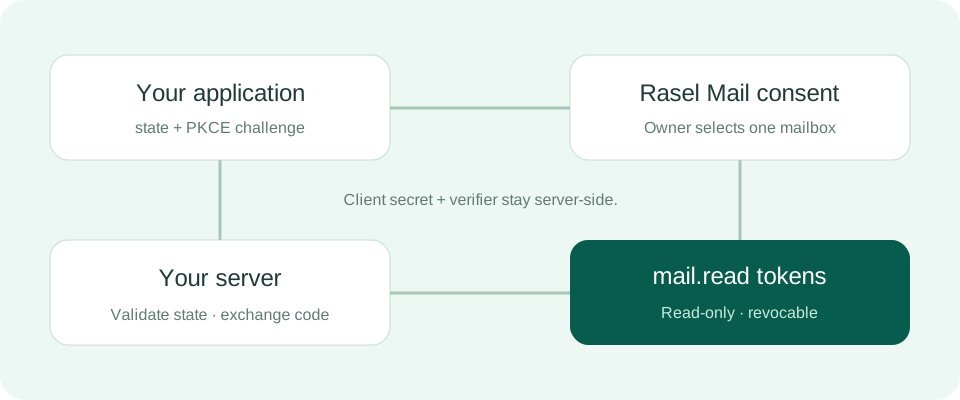
- Generate a random state and secure 43–128-character URL-safe code_verifier, then derive the SHA-256 Base64URL challenge without padding.
- Store state and verifier against the initiating session and redirect the user to authorization.
- The user signs in, selects a mailbox and approves or denies. Validate state at callback before handling code or error.
- Exchange code server-side with the same verifier and redirect_uri. The authorization code is short-lived and single-use.
Build an authorization URL
Node.js — persist state and verifier before redirect
import { randomBytes, createHash } from 'node:crypto';
const state = randomBytes(32).toString('base64url');
const verifier = randomBytes(32).toString('base64url');
const challenge = createHash('sha256').update(verifier).digest('base64url');
// Store { state, verifier } in the initiating server-side session.
const url = new URL('https://raselmail.com/oauth/authorize');
url.search = new URLSearchParams({
  response_type: 'code', client_id: 'YOUR_CLIENT_ID',
  redirect_uri: 'https://client.example/oauth/callback',
  scope: 'mail.read', state,
  code_challenge: challenge, code_challenge_method: 'S256',
}).toString();
// Redirect the browser to url.href.
Exchange the code server-side
Code exchange
curl -i 'https://raselmail.com/api/v1/oauth/token' -u "$RASEL_CLIENT_ID:$RASEL_CLIENT_SECRET" --data-urlencode 'grant_type=authorization_code' --data-urlencode "code=$AUTHORIZATION_CODE" --data-urlencode 'redirect_uri=https://client.example/oauth/callback' --data-urlencode "code_verifier=$PKCE_VERIFIER"Do not expose the client secret in public browser JavaScript. Respect access_denied. Do not log authorization codes or tokens, or leak them to analytics URLs.